API Synchronisation settings
API Sync settings are used for configuring access rights for the TermWebIntegrator application between TermWeb 5 and Trados Studio and Multiterm versions 2024/2022/2021. This provides a local Multiterm file that can be used in translation projects with Trados Studio software.
License Requirements
XML-RPC API needs to be set to enabled on the License page. This is viewable via the Administration menu System > License for users with the System Administrator role. If you are unable to access this page and unsure if you have this license enabled, please contact TermWeb Support.
Access requirements prior to configuring API Synchronisation settings
Non-administrator users accessing TermWeb via the TermWebIntegrator are required to have access to the View Concept permission at least one Dictionary via Permission Schemes as well as belong to a User group with Allow API access enabled.
Users with either the Administrator or System Administrator user role will bypass all access permissions and restrictions set by API synchronisation settings.
API sync settings list
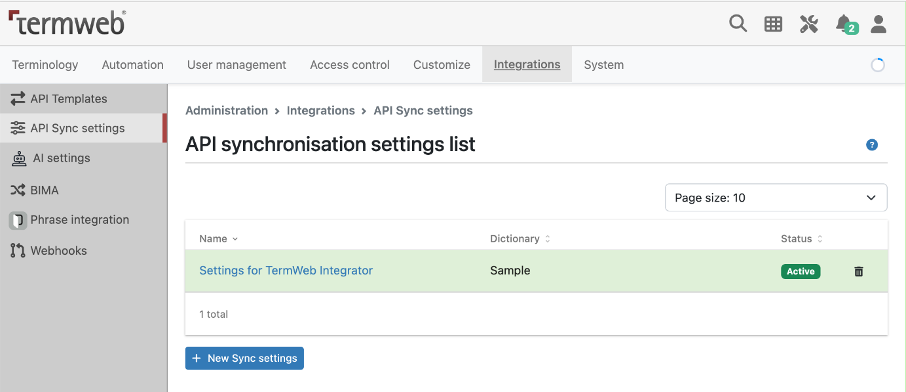
API Sync settings is a configuration page available via the Administration menu in TermWeb to restrict which languages and filtered list of Terms and/or Concepts should be downloaded as a Multiterm file for specified User group(s). Read and write permissions to this page require either the Administrator or System Administrator user role.
The API sync list will show a list of all currently created API synchronisation settings. It is recommended that a synchronisation setting be created for each group accessing TermWeb using the TermWebIntegrator to restrict the ability for users to download a full copy of a termbase as well as shorten the time it takes to download any future copies.
New API synchronisation setting
A new API synchronisation setting can be set up by clicking the + New Sync Settings button.
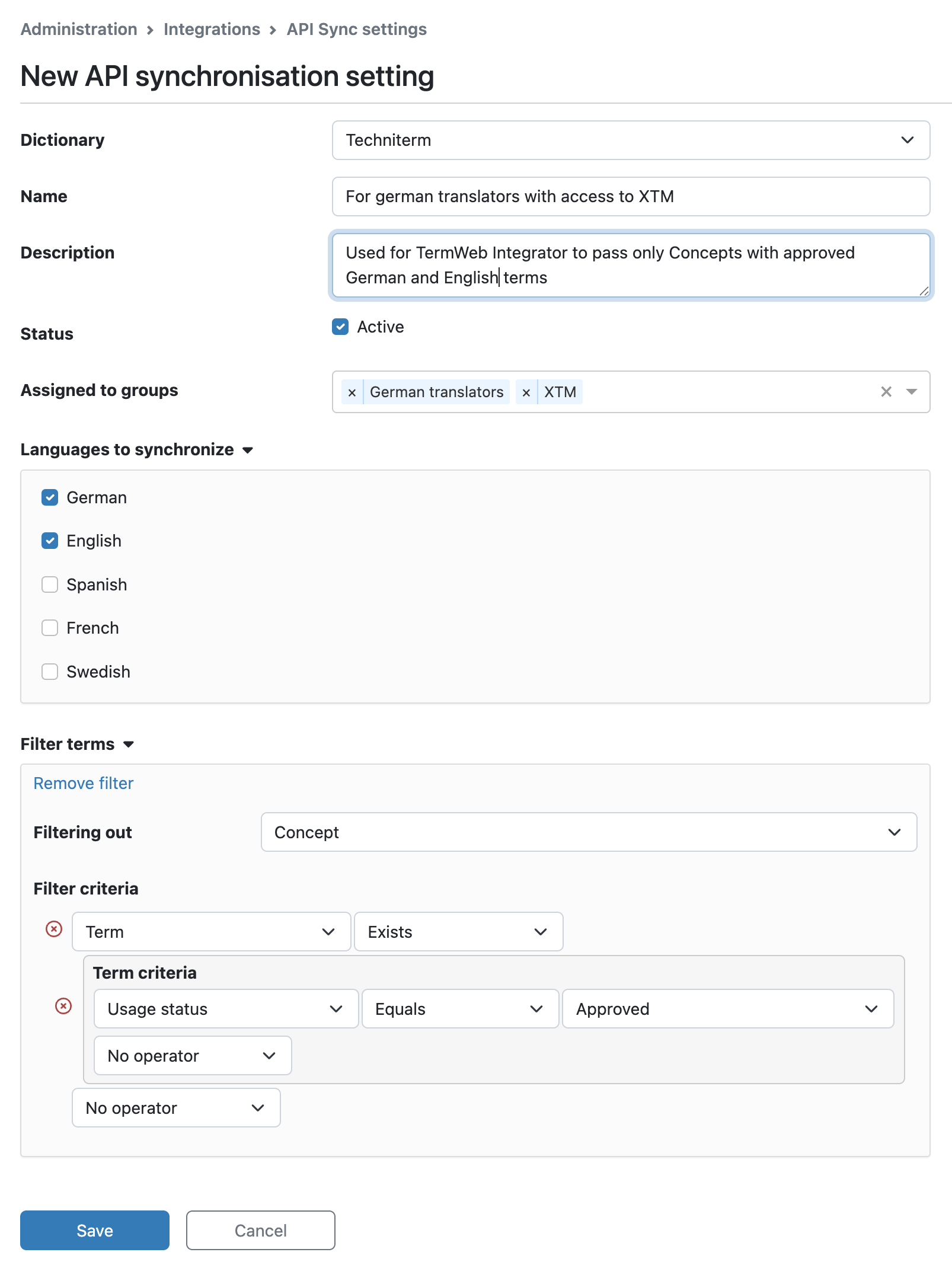
These settings include several configurations settings as noted below:
-
Dictionary
Required field. Single picklist showing the full list of termbases available in the TermWeb client. -
Name
Required field. Needs to be unique in a specific TermWeb client. -
Description
Custom descriptive text to describe the use of this API synchronisation setting. -
Status
Active checkbox to denote whether the current API synchronisation setting is turned on or off. -
Assigned to groups
Multi-value picklist showing the full list of User groups available in the TermWeb client. Any User groups assigned to this row will be provided access to the Languages and Filter terms as specified below.Users belonging to more than one User group that are individually assigned to different API Synchronisation settings will use the union of permissions. -
Languages to synchronize
Only the selected languages will be downloaded for the target user. Recommended security settings for localization are that specific language pairs, such as Source and Target, are enabled for translators of the specified language pair. -
Filter terms
Sets Conditions for restricting which Terms/Concept are downloaded. Recommended requirements are that only approved validated terminology is downloaded.